
Google’s ranking system does not care how good your plumbing is if your website takes forever to load. If your tradie website isn’t hitting Core Web Vitals, you are not just losing rankings — you’re losing jobs.
Here’s the thing: while you’re out there fixing leaky pipes and rewiring houses, Google’s been busy rewiring how it ranks websites. The search giant now uses something called Core Web Vitals as a ranking factor, and if your site’s slower than a Monday morning apprentice, you’re missing out on calls that could be heading straight to your competitors.
This isn’t another tech article full of jargon that’ll put you to sleep faster than a safety meeting. We’re breaking down exactly what these vitals mean, how to fix them without needing a computer science degree, and how to keep your site running faster than a sparkie chasing overtime rates.
Table of Contents
Why Website Speed Matters in 2025
40% of users abandon a website if it takes more than 3 seconds to load.
Let that sink in for a moment. Nearly half your potential customers are gone before they even see what you do. For tradies, this hits harder than a hammer to the thumb. Think about it — when someone’s searching "emergency plumber near me" at 2 AM with water flooding their kitchen, they’re not hanging around for slow websites. They’re calling the first bloke whose site loads fast enough to show a phone number.
The numbers don’t lie, and they’re particularly brutal for trade businesses. Most customers searching for emergency services or quick quotes are on mobile devices, often in stressful situations where every second counts. A slow-loading site isn’t just annoying — it’s the difference between getting that call and watching it go to your competitor down the road.
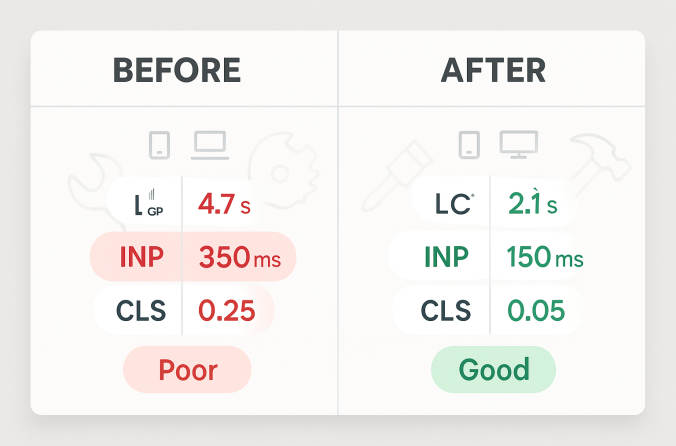
Google’s been crystal clear about this since they rolled out Core Web Vitals for tradies as a ranking factor. The search engine giant now measures three key metrics that directly impact where your site shows up in search results: Largest Contentful Paint (LCP), Interaction to Next Paint (INP), and Cumulative Layout Shift (CLS). These aren’t just fancy tech terms — they’re the difference between showing up on page one or getting buried where nobody looks.
Here’s a real case that’ll make you pay attention: A Brisbane roofing company was struggling with their website speed Australia performance. Their site was taking 4.7 seconds to load on mobile, and they were wondering why their phone wasn’t ringing despite decent Google Ads spend. After implementing tradie site optimization techniques and cutting their load time to 2.1 seconds, their calls from Google tripled in six weeks. Same ads, same budget, but now their site was fast enough to actually convert visitors into customers.
The mobile factor can’t be ignored either. Over 70% of trade service searches happen from phones, and mobile users are even less patient than desktop users. When someone’s standing in their flooded bathroom at midnight, they’re not waiting for your image gallery to load. They want your phone number, and they want it now.
But it’s not just about emergency calls. Even planned work suffers when sites are slow. Homeowners comparing quotes will bounce from slow sites faster than you can say "free estimate." They’ll move on to the next tradie whose site loads quickly and makes it easy to request a quote. In the trade game, speed isn’t just about convenience — it’s about capturing leads before they slip away to competitors who’ve got their technical house in order.
Trade-Specific Fixes That Make a Difference
Right, let’s get our hands dirty with some actual fixes. These aren’t theoretical improvements that might help someday — these are practical changes that’ll speed up your site faster than you can finish a coffee break. Most of these you can tackle yourself, and the ones you can’t are worth paying someone to sort out properly.
Compress and Resize Job Photos
Here’s where most tradies shoot themselves in the foot without realizing it. You’ve just finished a brilliant bathroom renovation, snap a few photos with your iPhone, and upload them straight to your website. Problem is, that "quick photo" is actually a 4MB monster that takes longer to load than it took you to tile the shower.
Think of image compression like packing your tools efficiently. You wouldn’t throw everything loose in the back of your ute — you’d organize it properly to fit more in less space. Same principle applies to your photos. Use WebP format instead of JPEG when possible (it’s like having a better toolbox that fits more gear), and resize images to under 1000 pixels wide. Unless someone’s printing your photos on a billboard, they don’t need to be massive.
Tools like TinyPNG or Google’s Squoosh make this dead simple. Upload your photo, download the compressed version, and you’re done. A 4MB photo becomes 400KB without losing quality that anyone would notice on a screen. That’s the difference between a 3-second load time and a 30-second one on a slow mobile connection.
Host Locally, Not Overseas
This one’s a biggie that catches out heaps of Australian trade businesses. Your website might be hosted on a server in the US or Europe because it was cheaper, but that’s like storing your tools in another state and driving there every time you need a screwdriver. The distance matters, and it’s costing you customers.
When someone in Perth tries to load your site that’s hosted in Texas, the data has to travel halfway around the world. That adds precious seconds to your load time — seconds that could mean the difference between a phone call and a lost customer. Australian hosting providers like VentraIP, SiteGround AU, or even the big players with local data centers will serve your content from Sydney or Melbourne servers.
The speed difference is dramatic. A site hosted overseas might take 2-3 seconds just to establish a connection, while local hosting can cut that to under 200 milliseconds. For Core Web Vitals for tradies, this single change can move you from "needs improvement" to "good" without touching anything else.
Use a Lightweight Theme or Builder
Here’s where things get interesting. Some website themes are like bringing a full workshop to hang a picture — massive overkill that slows everything down. Themes like Divi or heavily customized Elementor sites might look fancy, but they’re loading more code than a government website.
Think of your website theme like choosing between a basic ute and a fully loaded truck for a simple pickup job. Sure, the truck has more features, but if you just need to move some pipes, the ute gets there faster and uses less fuel. Lightweight themes like GeneratePress, Astra, or even hand-coded layouts load faster because they’re not carrying unnecessary baggage.
The difference is substantial. A bloated theme might load 2MB of code before showing any content, while a lightweight theme loads 200KB. That’s like the difference between carrying a full toolbox versus just the tools you actually need for the job.
Enable Browser Caching
Browser caching is like having regular customers who know where you keep everything. The first time someone visits your site, their browser downloads all your images, stylesheets, and scripts. With caching enabled, return visitors don’t need to download everything again — their browser remembers and loads the stored version instead.
Most caching plugins handle this automatically. WP Rocket, W3 Total Cache, or even free options like WP Super Cache will set this up for you. It’s like having a well-organized van where everything has its place and you can find what you need instantly on repeat jobs.
The impact on tradie site optimization is huge for return visitors. Someone checking your services page, then your contact page, then back to services won’t need to reload everything each time. The site feels snappy and responsive, which builds confidence in your professionalism.
Cut Unused Plugins & Scripts
This is like cleaning out your toolbox — you’d be amazed how much junk accumulates over time. Every plugin you install adds code that needs to load, even if you’re not actively using it. That contact form plugin you tried six months ago? Still loading scripts on every page. The fancy animation plugin you used once? Still slowing things down.
Do a monthly audit of your plugins. If you haven’t used it in the last three months, bin it. Contact form plugins, popup builders, and animation libraries are common culprits that delay your Largest Contentful Paint (LCP) — the time it takes for your main content to appear.
Think of CLS like a toolbox sliding off the ute because it wasn’t strapped in properly. Cumulative Layout Shift happens when elements move around as the page loads, and it’s often caused by ads, embedded content, or poorly coded plugins loading after everything else. Clean up your plugins, and you’ll clean up your Core Web Vitals scores.
Tool Walkthroughs: PageSpeed Insights, GTmetrix, More
Alright, time to get practical. Testing your website speed Australia performance isn’t rocket science, but you need to know which tools actually matter and how to read the results without getting lost in technical gibberish. Think of these tools like different gauges on your dashboard — each one tells you something important about how your site’s performing.
Google PageSpeed Insights
This is your main diagnostic tool — like the multimeter in your electrical kit. It’s free, it’s from Google (so it matters for rankings), and it gives you the exact Core Web Vitals scores that affect your search position. Head to pagespeed.web.dev, paste in your website URL, and hit analyze.
Here’s what to focus on: the tool gives you separate scores for mobile and desktop. Always check mobile first — that’s where most of your customers are coming from. The three numbers that matter most are LCP (Largest Contentful Paint), INP (Interaction to Next Paint), and CLS (Cumulative Layout Shift). Green is good, orange needs work, red means you’re losing customers.
Don’t get overwhelmed by the technical suggestions like "eliminate render-blocking resources" — focus on the opportunities section instead. It’ll tell you exactly what’s slowing your site down in plain English. Usually, it’s images that are too big, scripts loading in the wrong order, or your hosting being slower than a government approval process.
Pro tip: Test your homepage, your services page, and your contact page separately. Sometimes one page is dragging down your whole site’s performance, and you need to know which one needs attention first.
GTmetrix
If PageSpeed Insights is your multimeter, GTmetrix is like having X-ray vision for your website. It shows you exactly what’s loading, in what order, and how long each piece takes. The waterfall breakdown is pure gold — it’s like watching your site load in slow motion so you can spot exactly where things go wrong.
Sign up for a free account (worth it for the extra features), paste your URL, and run the test. The waterfall chart shows every file your site loads as a horizontal bar. Long bars mean slow files, and you can see exactly which images, scripts, or stylesheets are the troublemakers.
The "Structure" tab is where the magic happens for tradie site optimization. It breaks down your page structure and highlights issues like missing alt tags, oversized images, or inefficient code. It’s like having a building inspector go through your site and point out everything that’s not up to code.
Use GTmetrix when you want to dig deeper than PageSpeed Insights. If Google’s tool says your images are too big, GTmetrix will show you exactly which images and how big they are. It’s the difference between knowing you have a leak somewhere versus knowing exactly which pipe is dripping.
WebPageTest.org
This one’s for when you want to get really nerdy about your site performance. WebPageTest is like the oscilloscope of website testing — incredibly detailed, but you probably don’t need it unless you’re dealing with complex performance issues or you’ve got a developer who likes to dive deep into the technical weeds.
The main advantage is that you can test from different locations and connection speeds. Want to see how your site performs for someone on a slow mobile connection in regional Queensland? WebPageTest can simulate that. It’s particularly useful for trade businesses that serve large geographic areas where connection quality varies dramatically.
The filmstrip view is brilliant — it shows you screenshots of your page loading over time, so you can see exactly when your content becomes visible. For Core Web Vitals for tradies, this helps you understand when your phone number and contact information actually appear on screen, which is crucial for emergency service calls.
Uptrends Mobile Test
Here’s a tool that’s particularly relevant for Australian trade businesses. Uptrends lets you test your mobile site speed from different Australian locations, which matters more than you might think. A site that loads quickly in Sydney might crawl in Perth due to network infrastructure differences.
The mobile-specific testing is crucial because it simulates real mobile devices and connections, not just a desktop browser pretending to be mobile. When someone’s searching for "emergency electrician" on their phone while standing in a dark house, they’re not on a perfect WiFi connection — they’re on mobile data that might be patchy.
Pro tip for all these tools: Always test from Australian servers when possible. A test from a US server might show great results, but your actual customers in Australia could be having a completely different experience. It’s like testing your van’s performance on a flat road when your customers live up hills — the real-world conditions matter.
Mobile vs Desktop Optimization: What Tradies Miss
Here’s the biggest mistake trade websites make: they test everything on a desktop computer and call it good. Meanwhile, 70% of their customers are trying to load the site on phones while dealing with emergencies, planning projects, or comparing quotes during their lunch break. It’s like designing a van based on how it looks in the showroom instead of how it performs on actual job sites.
The mobile experience isn’t just a smaller version of your desktop site — it’s a completely different beast with different priorities, different constraints, and different user behavior. When someone’s phone screen is cracked, they’re standing in the rain, and they need a plumber right now, your fancy desktop animations and full-width image sliders become obstacles instead of features.
Mobile users are task-focused and impatient. They want three things: proof you can do the job, a way to contact you immediately, and confidence that you’re legitimate. Everything else is just getting in the way. Your mobile site needs to deliver these three things faster than your competition, or the customer moves on to the next search result.
Button size matters more than you think. Apple’s guidelines recommend minimum 44 pixels for touch targets, but for trade sites dealing with stressed customers, bigger is better. Think about trying to tap a tiny "Call Now" button when your hands are shaking because water’s pouring through your ceiling. Make those contact buttons impossible to miss and easy to hit, even with cold fingers or work gloves.
Here’s a real example that’ll make you rethink your mobile strategy: We worked with a Perth electrician whose mobile site was loading a full-width video background on the homepage. Looked impressive on desktop, but on mobile it was a disaster. The video file was 15MB, taking over 30 seconds to load on a typical mobile connection. Mobile LCP was sitting at 6.1 seconds — basically unusable for emergency calls.
The fix was simple but dramatic. We replaced the video with a static hero image optimized for mobile, added a prominent "Emergency Call" button, and moved the video to a separate "About Us" page for people who actually wanted to watch it. Mobile LCP dropped to 1.9 seconds overnight, and emergency call conversions increased by 180% within two weeks.
The lesson? Mobile users don’t want to be entertained — they want problems solved. Save the fancy stuff for desktop where people have time to appreciate it. On mobile, prioritize speed, clarity, and immediate action options.
Sticky elements are your friend on mobile. A floating call button or "Request Quote" tab that follows users as they scroll can dramatically improve conversion rates. It’s like having your business card permanently visible instead of buried in someone’s wallet. Just make sure these elements don’t interfere with content or cause layout shifts that hurt your CLS score.
Image optimization becomes even more critical on mobile. That before-and-after gallery that looks great on desktop might be killing your mobile performance. Consider using image carousels instead of loading all photos at once, or implement lazy loading so images only load when users actually scroll to them. It’s the difference between bringing all your tools to every job versus just bringing what you need.
Form design needs special attention on mobile. Long contact forms that work fine on desktop become conversion killers on small screens. Stick to essential fields only — name, phone, brief description of the job. You can get the details when they call. Every extra field is another chance for them to give up and call your competitor instead.
Speed Maintenance Checklist for Trade Sites
Just like your tools need regular maintenance to stay sharp, your website needs regular attention to stay fast. Even the quickest sites get sluggish over time as you add content, install updates, and accumulate digital clutter. The good news is that a monthly speed audit takes less time than servicing your van and can prevent way more headaches.
Think of this as your monthly safety check, but for your website. You wouldn’t skip checking your ladder before a roof job, so don’t skip checking your site speed before it starts costing you customers. Set a reminder for the first Monday of each month — make it as routine as checking your tool inventory.
Monthly Speed Maintenance Checklist
Use PageSpeed Insights for both your homepage and main service pages
Run recent photos through TinyPNG or similar compression tools
Keep everything current, but test speed after major updates
Most caching plugins have a "clear all cache" button — use it
If you haven’t used it in 3 months, delete it
Always verify that updates haven’t broken your speed scores
Get alerts if your site goes down — customers won’t wait
The beauty of this routine is that it prevents small problems from becoming big ones. That plugin you installed last month might be working fine but loading unnecessary scripts on every page. Those new job photos might look great but be slowing down your gallery page. Catching these issues early means fixing them before they start costing you business.
Here’s a pro tip that most tradies miss: schedule your speed tests for different times of day. Your site might load quickly at 9 AM when traffic is light but crawl at 7 PM when everyone’s browsing on their phones. If you’re consistently slow during peak hours, it might be time to upgrade your hosting plan or optimize your database.
Don’t forget about seasonal factors either. If you’re a roofer, your site traffic probably spikes during storm season. If you’re an air conditioning specialist, summer brings more visitors. Test your site performance during these peak periods to make sure it can handle the increased load without slowing down.
Keep a simple log of your monthly tests — just the date, your PageSpeed scores, and any changes you made. It’s like keeping a maintenance log for your van. Over time, you’ll start to see patterns and understand what affects your site’s performance. Plus, if something breaks, you’ll know exactly when it happened and what might have caused it.
The uptime monitoring piece is crucial but often overlooked. Your site could be down for hours without you knowing, especially if you’re out on jobs all day. Services like UptimeRobot will ping your site every few minutes and send you an alert if it goes offline. It’s like having a security system for your digital shopfront — you want to know immediately if something’s wrong.
Free Speed Audit for Trade Websites
Get Your ReportWe’ll run your site through Google’s tools and send you a clear, no-jargon report. No obligation — just pure performance data.
Look, website speed isn’t just another tech buzzword that’ll disappear next year — it’s fundamental to how Google ranks sites and how customers experience your business online. The numbers don’t lie: a 2-second delay in mobile load time can cut your leads in half. In the trade game, where emergency calls and quick quotes drive most of the business, that’s the difference between a thriving company and one that’s always wondering why the phone isn’t ringing.
The Core Web Vitals for tradies aren’t going anywhere. If anything, Google’s getting stricter about site performance as mobile usage continues to dominate. The businesses that get ahead of this now — that optimize their tradie site optimization and maintain fast website speed Australia standards — will have a massive advantage over competitors who are still figuring out why their beautiful websites aren’t converting visitors into customers.
Never assume your site is fast just because it loads quickly on your office computer with high-speed internet. Test it regularly, test it on mobile, and test it like your customers would — stressed, in a hurry, probably on a patchy mobile connection. The tools are free, the fixes are mostly straightforward, and the impact on your business can be dramatic.
Remember that Brisbane roofing company we mentioned earlier? They didn’t just get more calls — they got better quality leads. Fast sites build trust, and trust leads to higher-value jobs and better customer relationships. When your site loads quickly and works smoothly, customers assume your actual work will be just as professional and reliable.
Google rewards fast trade websites with higher map pack visibility and more organic traffic. It’s not just about rankings anymore — it’s about being found when customers need you most. In emergency situations, in competitive markets, and in an increasingly mobile world, speed isn’t just an advantage — it’s essential for survival.
Start with the basics: compress your images, check your hosting location, clean up unused plugins, and test your mobile performance monthly. These simple steps will put you ahead of most trade websites and give you a solid foundation for growth. Your future self — and your bank account — will thank you for taking action now instead of waiting until your competitors figure this out too.
Footer Disclaimer
All tool data and recommendations accurate as of June 2025. Core Web Vitals definitions may update as Google evolves performance standards.